Accessibility-First design is about making the user experience smoother and more intuitive.
A poorly designed website is frustrating to all users, but to those who need accessibility considerations, it could be blocking them from navigating your website. Features like clear typography, easy navigation, and high contrast are not only useful for those with disabilities – they enhance usability for everyone…
Understanding what is web accessibility and why it’s no longer an option can help you improve your website design and give users the best experience. Here’s how you can go beyond the bare minimum and why it benefits your online presence.
You’re building a website to represent your brand, promote your services, or sell your products, so why not make sure it works for everyone? Accessibility-first design isn’t just about ticking off a compliance checklist. It’s about creating a website that functions for all users and offering tangible benefits for your business.
What Is Web Accessibility?
Web accessibility ensures that your website – and the tools and features on it – is designed to accommodate everyone, including those with disabilities. With an accessible website design, everyone – regardless of their physical or cognitive abilities – can navigate and interact with your website and its content.
Is an Accessibility-First Web Design Required?
Legally, accessible web design is no longer optional in many countries. Laws like the Americans with Disabilities Act (ADA) in the U.S., the Accessibility for Ontarians with Disabilities Act (AODA) in Canada and other laws in countries require businesses open to the public to have accessible, inclusive web design.
These laws require businesses to follow the Web Content Accessibility Guidelines (WCAG), which set the standards for web accessibility guidelines. Section 44 of the IRS Code provides up to $5,000 in tax incentives for website accessibility. In contrast, businesses that fail to comply with ADA compliance may face penalties, lawsuits and reputational damage.
However, it’s important to consider accessibility-first design beyond what’s legally required. Even if your website meets WCAG and ADA standards, there may be some lapses that could prevent people with disabilities from fully navigating and appreciating it. Additionally, some design elements may still not be optimized for navigation — to the point that they frustrate people with or without disabilities.
Why Accessibility Is a Must for Your Website
Beyond the legal liabilities of non-compliance with Web Content Accessibility Guidelines standards, there are many key reasons why accessibility is a must for your business website.
General Usability for All
A well-designed website benefits everyone, not just users with disabilities. Clear, intuitive navigation, readable text and optimal color contrast give users a better experience, especially on mobile devices with smaller screens and more streamlined interactions.
Bigger Audience Reach
The World Health Organization reports that 1.3 billion people worldwide have some form of disability. If your website has limitations that prevent those with disabilities from browsing it, you may be turning away potential customers. Creating an inclusive website ensures everyone can read more about your products and services.
Improve Lead Generation and Conversions
Users are more likely to stay longer and perform actions like making an online purchase, booking an appointment or contacting your business with inquiries. Additionally, many website accessibility standards — such as providing clear call-to-action buttons — can help all users take desired actions.
Boost SEO Efforts
User experience can indirectly impact your search engine optimization (SEO) strategies:
Reduce Bounce Rates: When users are redirected to your landing page, they decide whether your website has what they’re looking for within seconds. A well-designed landing page can hook them to stay, reducing your bounce rates.
Mobile-Friendly Design: Search engines like Google prioritize mobile-friendly websites for both desktop and mobile users. Many mobile-friendly design features put easy and accessible navigation at the forefront, simplifying browsing for all mobile users.
On-Page SEO: Proper heading structures, descriptive alt text and readable content make it easy for both users and search engines to navigate a webpage. This contributes to higher rankings.
Future-Proof Your Website
There’s no telling what the standard for websites will look like. However, technology and web designs consistently evolve to provide a better user experience. Implementing accessibility-first principles now ensures your website remains competitive while meeting potential changes in legal standards for accessibility.
4 Key Principles of Accessibility-First Web Design
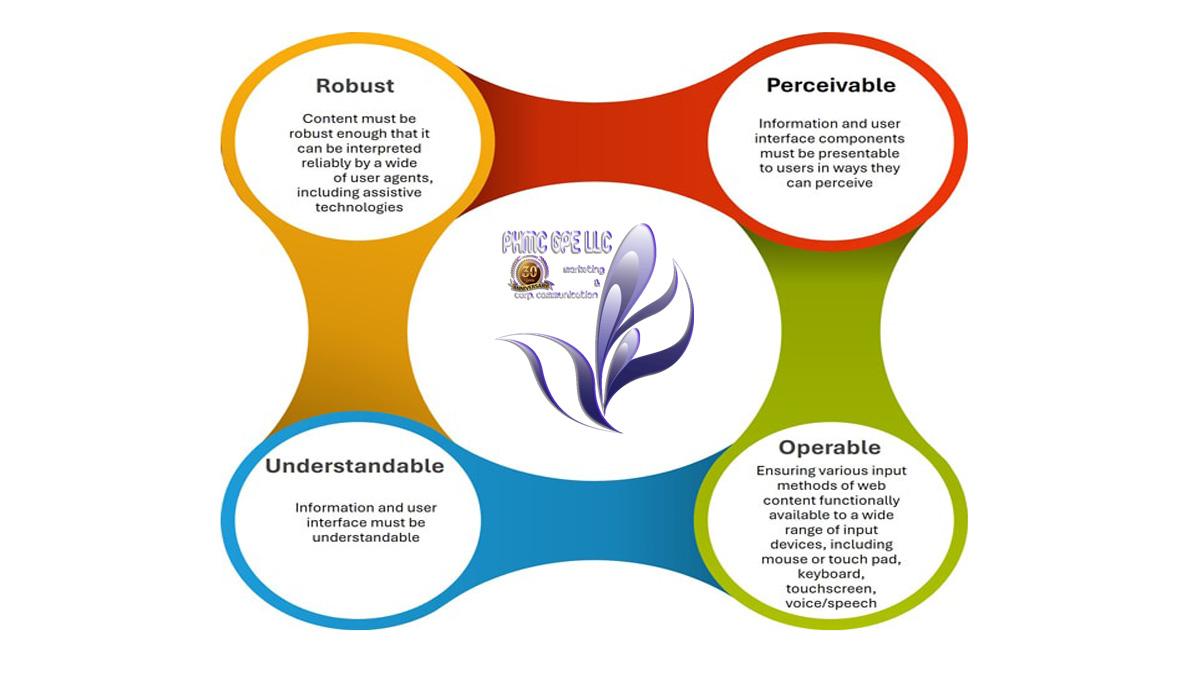
Under the latest version of Web Content Accessibility Guidelines (WCAG 2.1), one of the layers of guidance is its principles. These provide the foundation to ensure anyone can access or use web content. If you want to ensure total accessibility in web design features, your website must be:
1. Perceivable
Users must be able to perceive information on your website, regardless of their sensory abilities. If your website is purely text content, this may not be perceived by people with visual disabilities. Alternatively, if you have audio instructions or video content of someone talking about your products or services, those with hearing disabilities may not understand.
The best way to ensure your content is perceivable is to provide multiple formats to accommodate different conditions. This includes:
Alt Text for Images: Those with visual impairments use screen readers, which can process and read texts, including alt text.
Captions and Transcripts: While platforms like YouTube and TikTok can provide auto-caption features, these may not always be reliable. Providing captions for videos or transcripts for audio content ensures those with hearing impairments can digest content in another format.
Readable Text Design: Use high-contrast colors between your text and background to help users with low vision or color blindness. Text-resizing features also help users read content – particularly if they need to read paragraphs of text.
2. Operable
Websites must have interface components and navigation that are operable by all users. Users shouldn’t be able to rely solely on one method of navigation to access content. For example, people with motor disabilities may be unable to use a mouse or tap on their mobile device to click a small button. It becomes inaccessible if your website requires precise movement or gestures and has no alternative navigation option.
Some ways to make your website more operable:
Enable Keyboard Navigation: For example, instead of using a mouse, users on desktops can press Tab to open the menu or press Enter instead of requiring a mouse to click on a link.
Large Interactive Elements: Buttons and links must be large enough to click on. It should also be responsive and adapt accordingly to a mobile device’s size.
3. Understandable
All users must be able to understand the information on your website and how to navigate your website. An intuitive website design benefits all users and avoids confusion and frustration that deter them from engaging with your website. Some examples of understandable accessibility practices:
Plain and Simple Language: Use clear and simple language when writing content. This also benefits those who speak English as a second language.
Consistent Web Page Layouts: When product or service pages have similar information structures, users can easily find information and areas to click.
Helpful Error Messages and Suggestions: For example, a user may try sending an inquiry without inputting key information. Instead of a generic error message, guide them in correcting the issue, such as by highlighting it in the empty input field.
4. Robust
A robust website is designed to work across various devices, browsers and assistive technologies while remaining adaptable to future innovations. This is the technical side of a website. In addition to creating a responsive, mobile-friendly website, the structure must be compatible with various assistive technologies.
Clean HTML and Coding: This ensures screen readers and other assistive devices are compatible and can help users with disabilities navigate and understand your website.
Implement Accessible Rich Internet Applications: ARIA attributes help ensure dynamic content and interactive elements are more accessible.
Regular Feature Updates: Staying on top of the latest compliance standards and features like WordPress accessibility plugins ensures your website remains legally and ethically compliant.
Implementing Accessible Website Design
Implementing accessibility in web design beyond basic compliance requires a proactive approach to website accessibility. Here are some ways we recommend to effectively implement accessibility-first web design:
1. Follow Web Accessibility Guidelines
WCAG sets web accessibility standards globally. As of writing, WCAG 2.1 is the latest version with four principles (as mentioned above) and 13 guidelines.
Websites that meet these web accessibility standards are categorized based on their conformance level: A is the lowest, while AAA is the highest. Aim for at least a Level AA compliance and regularly check for any updates to see if your website meets usability standards.
2. Design With Accessibility in Mind
Instead of thinking of accessibility as a limitation to your design, think of accessible web design features as something that should be integrated from the beginning of the design process – rather than as an afterthought.
A website that is designed for accessibility can be appreciated by all users. By improving usability, you can improve the overall experience, which translates to a seamless experience that drives conversions.
3. Stay Updated on Web Accessibility Guidelines
Web accessibility standards regularly evolve, so meeting basic compliance standards isn’t a one-and-done process. Stay informed about any updates to WCAG and ADA or other regulations that apply to your business.
4. Use a Web Accessibility Checker
Double-check your web design to ensure it meets WCAG standards. Automated web accessibility checker tools identify and fix potential accessibility issues. They scan your web pages and provide detailed reports on areas that may not meet WCAG standards.
One free web accessibility checker tool you can use is Google’s Lighthouse, which audits web pages. One of the four categories it reports on is accessibility. Its accessibility audit is a pass or fail, so if your website doesn’t meet all of its accessibility criteria, your website automatically fails.
In Brief…
WHAT IS WEB ACCESSIBILITY AND WHY DOES IT MATTER? Web accessibility means designing your site so everyone, including people with disabilities, can use it without barriers. It matters because it improves usability for all visitors, reduces legal risks and helps your brand reach a wider audience.
IS AN ACCESSIBILITY-FIRST WEB DESIGN REQUIRED BY LAW? Yes. In many countries, laws such as the ADA in the U.S. and AODA in Canada require businesses to comply with accessibility standards like WCAG. Failing to do so can lead to lawsuits, penalties and reputational harm, while compliant businesses may even qualify for tax credits.
HOW DOES ACCESSIBLE WEB DESIGN BENEFIT BUSINESSES? Accessible websites improve the overall user experience, attract more visitors and support higher engagement. They also strengthen SEO by making content easier to read, navigate and index, which helps your site perform better in search results.
WHAT ARE THE MAIN PRINCIPLES OF ACCESSIBILITY-FIRST WEB DESIGN? Under WCAG 2.1, the four principles are perceivable, operable, understandable and robust. In practice, that means providing alternatives like alt text and captions, ensuring navigation works without a mouse, creating clear layouts and building sites that adapt to different devices and assistive technologies.
***
Building an accessible website goes beyond just ticking legal boxes or meeting minimum requirements. It’s about crafting an experience that welcomes all users, expands your reach, and drives deeper engagement. Accessibility-first design isn’t about a complete redesign; instead, it focuses on thoughtful, strategic improvements that enhance both usability and site performance.
By applying these principles, you’ll not only make your website more inclusive, but you’ll also enhance the overall experience for all users, regardless of their abilities. And the best part? Many of these changes can help boost your SEO, increase user engagement, and improve conversion rates.

 By
By 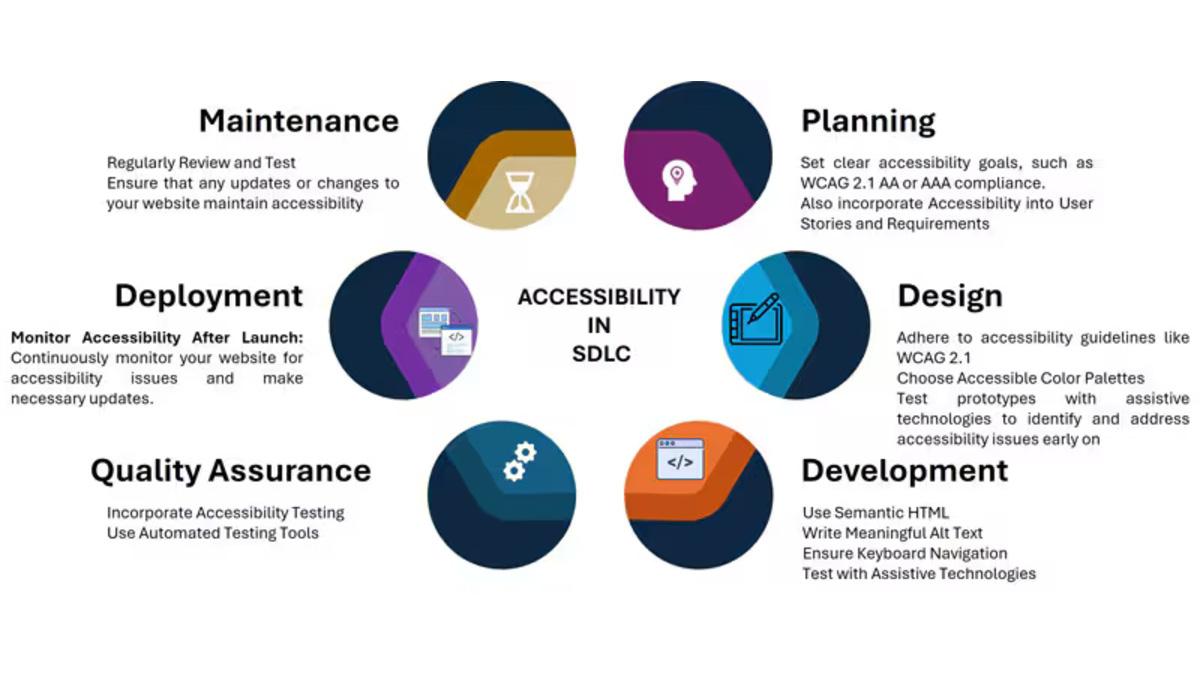

















Comments